Product release - October 2026
HubSpot integration is out of beta, open to every AWSsome customer and listed on the HubSpot Marketplace. Opportunities that AWS shares with you become HubSpot deals when you accept them, and the approval queue filters by your own HubSpot fields. Private offers can use your own payment schedule or upfront payment, and contract offers in EUR, GBP, AUD and JPY show that currency everywhere. Orders now show pending cancellation requests, and the whole app has a new look.
Highlights
- HubSpot integration (open to every customer)
- AWS opportunities become HubSpot deals: accept one in AWSsome and the deal appears in HubSpot
- Approval queue filters per pipeline: filter by HubSpot deal properties and pick your columns
- Private offers
- Your own payment schedule: set the amount and date of each payment, or bill the full amount upfront
- Offers in your currency: contract offers in EUR, GBP, AUD and JPY show that currency, not "$"
- Professional services offers: import the listing, then create the offer in AWSsome
- Cancellation requests on your orders: see a pending request and hear when the buyer answers
- New look: every screen redesigned for desktop, tablet and mobile
HubSpot integration
Open to every customer, and listed on the HubSpot Marketplace
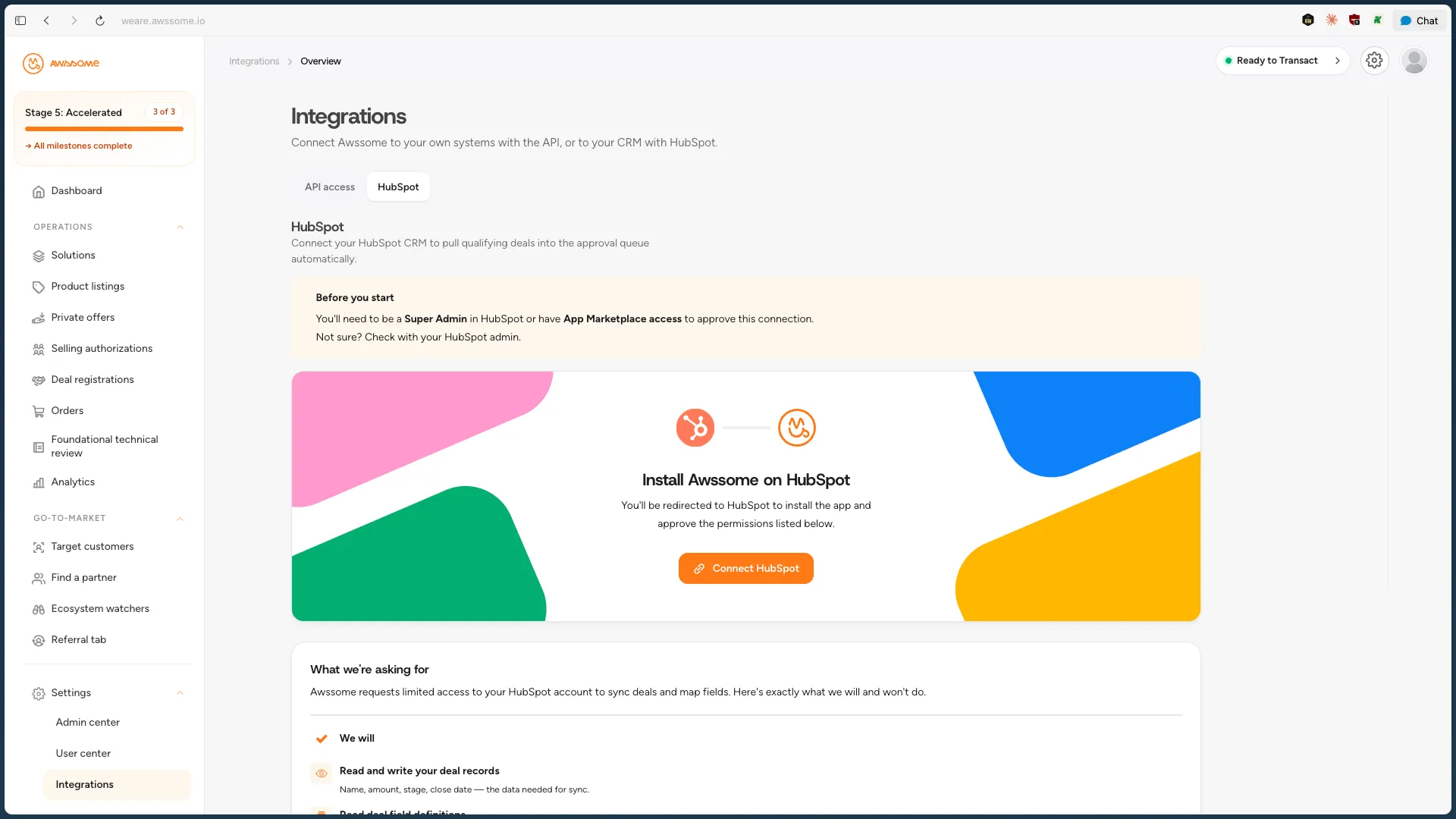
To connect it, go to Integrations in AWSsome and click Connect HubSpot. The setup guide guide walks you through each step.
AWS opportunities become HubSpot deals. When you accept an opportunity that AWS shares with you, AWSsome creates one deal in HubSpot, and asks which pipeline if you map several. AWSsome keeps the deal up to date when AWS changes the opportunity. If you connected HubSpot before the new permissions were added, reconnect once so each new deal is also linked to its HubSpot company. New connections do not need this.
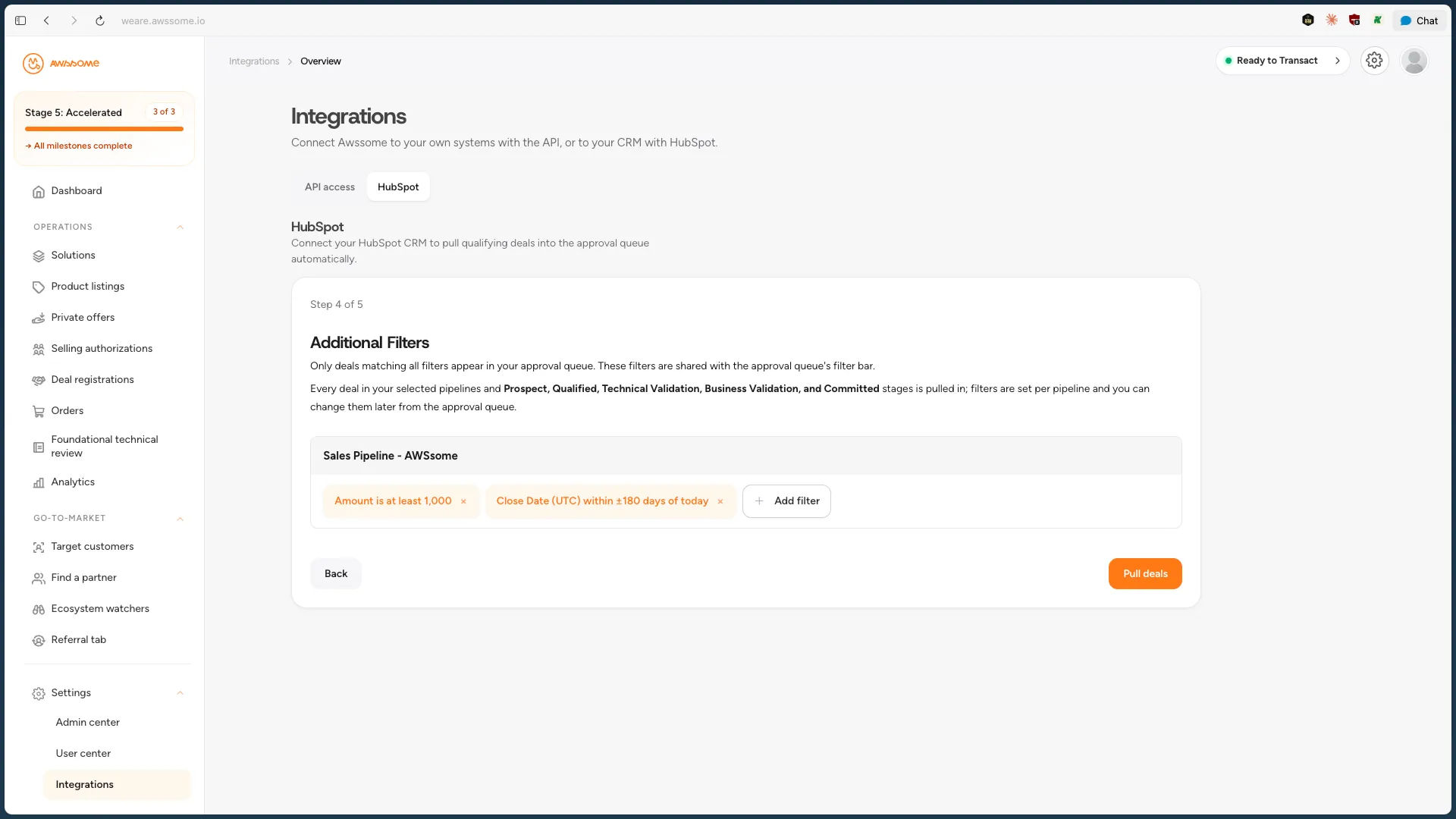
Filter the approval queue per pipeline. Filters on HubSpot deal properties replace the Good Fit and Not a Fit tabs, and you choose which properties show as columns. Your Good Fit rules carry over, and everyone in your workspace shares the same filters. The queue opens on deals that still need action, and "Show all deals" lists every status. In the setup wizard, the fit rules step is now Additional Filters, set for each pipeline.
Link deals you registered before connecting HubSpot. In the approval queue, use "Link to AWS opportunity" on a deal. When you open an AWS opportunity, use "Link HubSpot deal". Then choose "Keep AWS stage" or "Keep HubSpot stage", so both records have the same stage.
See why a deal can't be submitted. A "Can't submit" badge in the queue gives the reason, such as a missing Amount in HubSpot, and the Approve Deal window blocks Submit. If a check still fails at submit, the deal goes back to Pending so you can fix it and try again.
AWS Engagement Level now shows on your HubSpot deals. This field was hidden before, and it replaces the old AWS Engagement Score field. The AWS Shared field stops updating, so HubSpot workflows that use it no longer get new values. Use Awssome Status in those workflows instead, because it has the same information.
Private offers
Set your own payment schedule. On a contract offer you send to a buyer directly, enter the amount and invoice date of each payment, up to 86 payments, even when the amounts are not equal. AWSsome checks the dates against AWS's rules before you publish. The publish window reminds you that the schedule can't change once the buyer accepts.
Or bill the full amount upfront. On a contract offer, choose Upfront payment instead of Installment plan, and the buyer is billed the full amount when they accept. The choice locks once the offer is published.
Contract offers in EUR, GBP, AUD or JPY, shown in that currency. Offers and orders show amounts in the offer's currency instead of "$". JPY amounts must be whole numbers, and AWSsome checks this when you save and when you publish. The currency locks once the offer is published, because AWS does not allow it to change.
Private offers for professional services listings. Import these listings from AWS Marketplace on the Product Listings page, then pick one when you create a private offer.
One "Private Offer Expired" email, not one a day. An expired offer now sends that email once.
Orders
See cancellation requests on the order. When you ask AWS to cancel a buyer's agreement, the order shows "Cancellation pending" with your reason and the buyer's deadline. The order history keeps every request, and AWSsome alerts you when the buyer answers. You still send the request from the Agreements page in AWS Partner Central.
Alerts for AWS advisories and refunds. AWSsome alerts you when AWS raises or resolves an advisory on a buyer's agreement, with a link to the order. AWS gives no reason with an advisory, so read the details in AWS Partner Central. AWSsome also records each refund on the order and alerts you when it completes or fails.
No "new order" email for renewals. When a buyer renews or replaces an agreement, the new order no longer sends a "new order" email. AWSsome also no longer records the old order as Cancelled. If you use subscription provisioning, AWSsome now sends a new order to your system only after the buyer completes the registration form.
Solutions and FTR
See FTR eligibility for each solution. The Solutions list shows Eligible, Not eligible or Not checked, with the reasons on hover, and Create, Edit and Clone update the check as you link products. It is guidance only: saving and publishing work as before.
The FTR page is now a short guide. It sums up AWS's current process and opens AWS Partner Central, where you request FTR.
Onboarding
Retry a rejected business verification. If AWS rejects your business verification, correct your company details and try again. AWSsome now starts a new check with AWS, instead of showing the old rejection again.
Platform
A new look on desktop, tablet and mobile. Sign-in, onboarding and every screen are redesigned, with the same orange colours.
AWS's BOX program on your dashboard. A popup explains what AWS's Business Outcomes Xcelerator program offers and lets you book a call with us.
Signing out now signs you out everywhere. When you sign out, AWSsome ends your sessions on every device. Everyone is signed out once when this release goes live, so you need to sign in again.
Faster Private Offers and Integrations pages. The Private Offers page opens faster when many different people have created offers. The Integrations page no longer covers the whole screen with a loader while it loads.
Under the hood. The HubSpot connection now uses HubSpot's newer, date-based API versions, before HubSpot ends support for the old ones in 2027. Before AWSsome signs in to your AWS account, it now checks the account number and role name. We also check the libraries we use for known security issues automatically. Editing user profiles is now more secure, and other parts of the app got security and reliability fixes.